How to Stream Multiple Audio Tracks in OBS
A Complete Guide to OBS Multi-Track Audio for Multilingual Live Streaming
Primary Keyword: OBS multi-track audio
Table of Contents
- What is OBS multi-track audio?
- Why multi-track audio matters for live streaming
- Benefits of using separate audio tracks
- Step-by-step OBS multi-track audio setup
- Best practices for multilingual broadcasting
- Common OBS audio mistakes
- Frequently Asked Questions
- Final Thoughts
What Is OBS Multi-Track Audio?
Modern live broadcasts are no longer limited to a single language or audio feed.
Sports broadcasters, OTT platforms, media organizations, houses of worship, universities, and enterprises increasingly deliver multiple language options during the same live event.
OBS multi-track audio allows producers to separate different audio sources into independent tracks, making it possible to deliver multilingual commentary, translated audio, clean feeds, and recording masters from the same production.
Instead of mixing everything into one stereo output, OBS enables each source to be assigned to specific audio tracks for greater flexibility.
Why Multi-Track Audio Matters
International audiences expect localized experiences.
Whether you're streaming:
- Sports
- Live news
- Conferences
- Webinars
- Worship services
- Product launches
- Educational events
Different viewers often require different audio experiences.
Examples include:
- Original commentary
- Spanish commentary
- Portuguese commentary
- AI translated audio
- Clean international feed
- Interpreter feed
- Accessibility audio
Using separate audio tracks makes these workflows significantly easier to manage.
Benefits of OBS Multi-Track Audio
Separating audio tracks provides several operational advantages.
Better Broadcast Flexibility
One production can support multiple audiences without rebuilding the broadcast.
Cleaner Audio Mixing
Commentary, microphones, music, ambient sound, and AI translation remain independently adjustable.
Easier Post-Production
Editors receive isolated audio tracks for faster editing and localization.
Improved Accessibility
Organizations can provide multiple language options without creating entirely separate productions.
AI Translation Integration
Modern AI platforms can receive isolated program audio while preserving separate production feeds.
How OBS Multi-Track Audio Works
OBS allows every audio source to be assigned to one or more tracks.
For example:
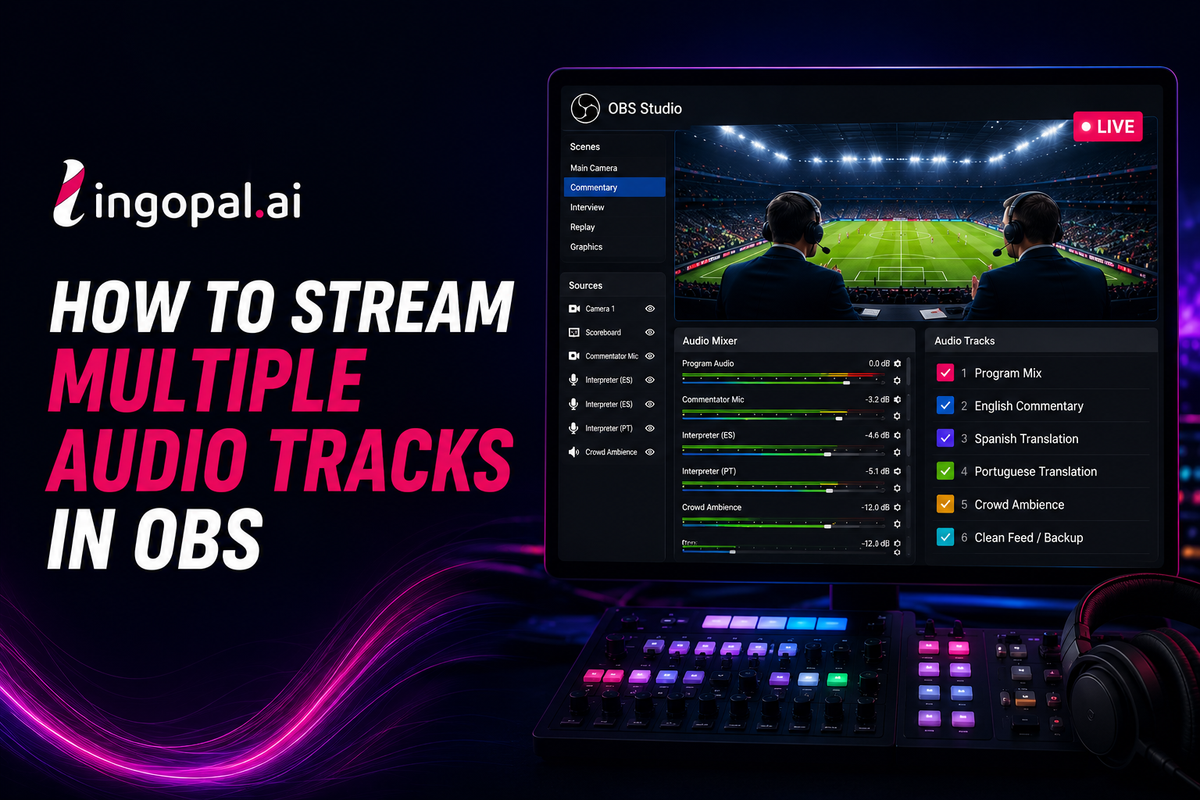
Track 1
Program Mix
Track 2
Original Commentary
Track 3
AI Spanish Translation
Track 4
Portuguese Commentary
Track 5
Crowd Ambience
Track 6
Backup Feed
Each destination can then use only the audio it requires.
Step 1: Configure Audio Tracks
Open:
Settings → Output
Under Recording or Streaming, enable multiple audio tracks.
OBS supports up to six audio tracks depending on your workflow.
Professional productions often reserve:
- Program
- Commentary
- Translation
- Music
- Ambient sound
- Backup
Planning this structure early simplifies live production.
Step 2: Assign Audio Sources
Open:
Advanced Audio Properties
Each audio source can now be assigned to specific tracks.
Examples include:
Microphones
Track 1 + Track 2
Interpreter Feed
Track 3
AI Translation
Track 4
Music
Track 5
Crowd Audio
Track 6
Avoid assigning every source to every track.
Keep routing intentional.
Step 3: Separate Commentary
For multilingual broadcasts, commentators should remain independent from program audio.
This enables:
- AI translation
- Human interpretation
- Multiple language feeds
- Clean international distribution
Commentary isolation significantly improves localization quality.
Step 4: Configure Monitoring
Before going live, monitor each track individually.
Confirm:
- Audio levels
- No clipping
- No duplicate routing
- Proper synchronization
- Correct language feed
Small routing mistakes become major production issues during live events.
Step 5: Connect AI Translation Platforms
Many AI translation platforms—including Lingopal—accept isolated audio inputs.
Typical workflow:
OBS
↓
Program Audio
↓
AI Speech Recognition
↓
Translation
↓
AI Voice Generation
↓
Multilingual Audio
↓
Distribution
Because commentary is already separated, translation quality improves significantly.
Step 6: Test Every Language Feed
Never assume routing works.
Verify:
- English
- Spanish
- Portuguese
- French
- German
Check:
- Audio synchronization
- Language selection
- Volume consistency
- Delay
- Speaker clarity
Each feed should behave independently.
Step 7: Record Backup Tracks
Even if you're only streaming live, record isolated tracks locally.
Separate recordings simplify:
- Editing
- Highlights
- Social clips
- VOD localization
- Quality review
Professional productions always preserve isolated masters.
Best Practices for Multilingual Streaming
Successful multilingual broadcasts usually follow these principles:
Keep Translation Separate
Never mix translated audio into the original commentary feed.
Standardize Audio Routing
Use the same track assignments for every production.
Consistency reduces operator mistakes.
Label Everything Clearly
Avoid generic names like:
Audio 1
Audio 2
Instead use:
English Commentary
Spanish AI
Crowd
Music
Interpreter
Maintain Consistent Levels
Language feeds should have comparable loudness.
Large volume differences create poor viewer experiences.
Test Under Live Conditions
Simulate:
- Multiple commentators
- Crowd noise
- Breaking news
- Rapid speech
- AI translation
Real broadcasts behave differently than studio demonstrations.
Common OBS Audio Mistakes
Many streaming issues originate from simple routing errors.
Common mistakes include:
- Mixing every source into every track
- Duplicate microphones
- Commentary on the wrong track
- Missing AI feed
- No backup recording
- Incorrect monitoring
- Different volume across languages
Most problems can be avoided with a standardized workflow.
OBS Multi-Track Audio + AI Translation
OBS has become a central production tool for multilingual broadcasting.
Combined with AI translation platforms, broadcasters can deliver:
- Live multilingual commentary
- AI voice dubbing
- Real-time captions
- Localized livestreams
- Multi-language VOD assets
One production can serve audiences worldwide without creating separate control rooms.
Frequently Asked Questions
What is OBS multi-track audio?
OBS multi-track audio allows different audio sources to be assigned to independent tracks, enabling separate recording, mixing, translation, and multilingual broadcasting.
How many audio tracks does OBS support?
OBS supports up to six configurable audio tracks for recording and advanced production workflows.
Why separate audio tracks?
Separate tracks improve flexibility for editing, AI translation, multilingual streaming, accessibility, and post-production.
Can OBS be used with AI translation?
Yes.
Many AI translation platforms integrate with OBS by receiving isolated audio tracks for speech recognition and multilingual voice generation.
Should every language have its own audio track?
For professional multilingual broadcasting, yes.
Independent tracks simplify monitoring, mixing, and distribution.
Final Thoughts
As multilingual live streaming becomes the standard for sports, news, entertainment, education, and corporate events, managing audio efficiently is just as important as producing high-quality video.
OBS multi-track audio provides the flexibility needed to separate commentary, translated speech, ambient sound, and program audio into organized workflows that scale across languages and distribution platforms.
When combined with AI livestream translation, isolated audio tracks enable broadcasters to deliver localized experiences while preserving synchronization, production quality, and operational efficiency.
For organizations looking to expand global reach without adding unnecessary production complexity, mastering OBS multi-track audio is an essential step toward broadcast-ready multilingual streaming.
Why Broadcasters Choose Lingopal
Lingopal integrates seamlessly into professional OBS workflows, enabling broadcasters, sports organizations, enterprises, and streaming platforms to deliver real-time AI translation, multilingual audio, live captions, and voice preservation from a single production pipeline.
Supporting 100+ languages, SRT, HLS, RTMP, MP4, API ingest, and cloud-native workflows, Lingopal helps teams scale multilingual live streaming without rebuilding existing broadcast infrastructure.
Ready to launch multilingual live streams?
Book a personalized demo and discover how Lingopal works alongside OBS to power global live broadcasting.