Why Broadcasters Are Rethinking Audio Workflows in 2026
How to Set Up OBS Multi-Track Audio for Live Streams (Without Doubling Your Production Work)
Imagine you're producing a live football match.
The video is perfect.
Graphics are live.
Instant replays are working.
Then someone asks:
"Can we also stream this in Spanish, Portuguese, French, German, and Arabic?"
Ten years ago, the answer usually involved multiple commentary teams, separate production rooms, dedicated audio engineers, and significantly higher production costs.
Today, it starts with a much simpler question:
Is your OBS audio workflow built correctly?
According to the Cisco Annual Internet Report, video accounts for more than 82% of all internet traffic, while live streaming continues to grow across sports, news, education, faith, gaming, and corporate communications.
At the same time, CSA Research found that 76% of consumers prefer content in their native language, and 40% won't buy—or even engage—with content in another language.
For broadcasters, that means multilingual audio is no longer a "nice-to-have."
It's becoming expected.
The good news?
If you're already using OBS multi-track audio, you're much closer to multilingual broadcasting than you might think.
What Is OBS Multi-Track Audio?
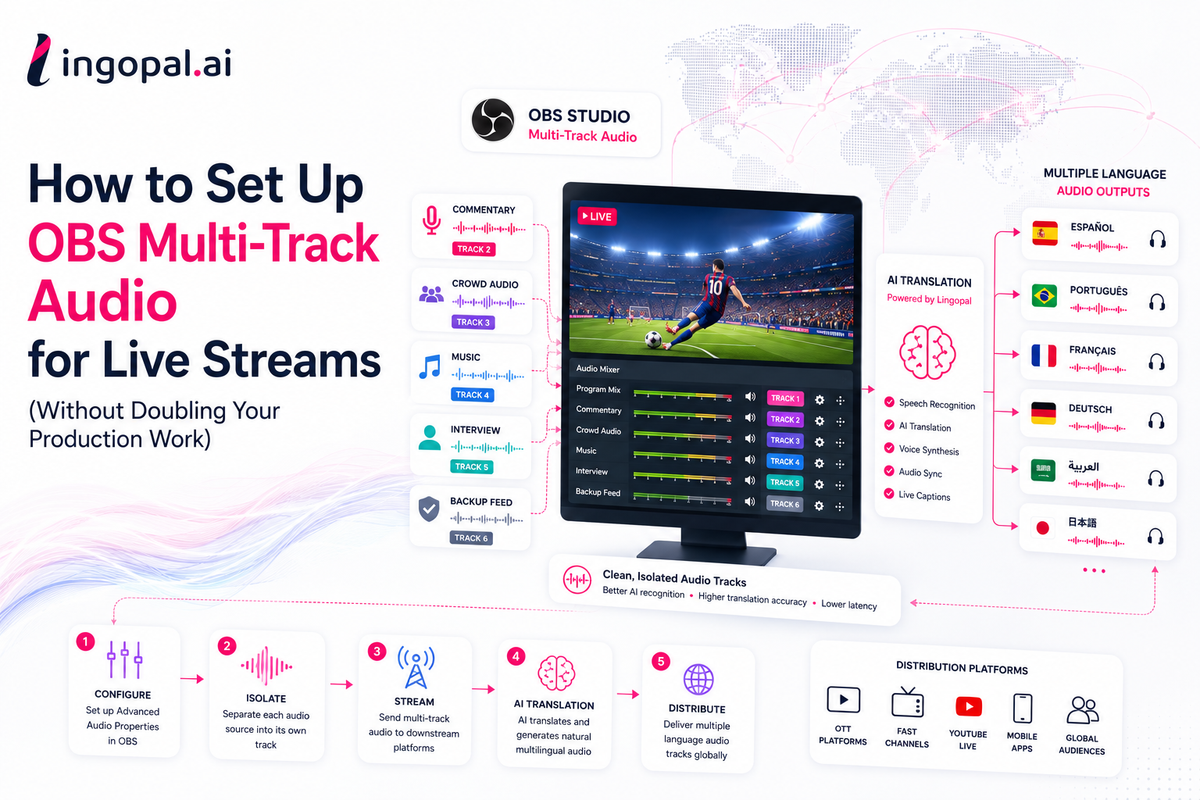
OBS multi-track audio allows you to create multiple independent audio outputs inside a single production.
Instead of sending one mixed audio feed, OBS can separate different audio sources into individual tracks.
For example:
Track
Audio Source
Track 1
Program Mix
Track 2
Commentary
Track 3
Crowd Audio
Track 4
Music
Track 5
Interpreter
Track 6
Backup Feed
This flexibility is why OBS has become one of the world's most widely adopted live production tools.
According to OBS Project, the software is downloaded millions of times every year and is used by broadcasters, esports organizations, universities, houses of worship, and media companies worldwide.
Why Multi-Track Audio Matters More Than Ever
Here's what many production teams don't realize:
AI translation works significantly better with isolated commentary than with fully mixed audio.
If commentary, crowd noise, music, and effects are combined into one track, AI has to separate them before translating.
That introduces:
- lower recognition accuracy
- more latency
- occasional translation mistakes
- inconsistent speaker detection
But if commentary is already isolated…
Everything becomes easier.
One Small OBS Setting Can Save Hundreds of Production Hours
Imagine producing 150 live events per year.
Without proper audio routing:
- manual audio cleanup
- separate localization workflows
- duplicated production tasks
Now multiply that by:
- 5 languages
- 10 languages
- 20 languages
The production complexity increases exponentially.
Proper OBS stream setup prevents this before the event even begins.
Step 1 — Enable Advanced Audio Properties
Inside OBS:
Edit → Advanced Audio Properties
Here you'll find track assignments for every audio source.
This is where the magic starts.
Instead of routing everything to Track 1:
Separate each important source.
Example:
Microphone → Track 2
Commentary → Track 3
Crowd FX → Track 4
Music → Track 5
Program Mix → Track 1
Now every downstream system receives clean audio.
Step 2 — Build Audio Like LEGO Blocks
Think of every audio source as a LEGO piece.
Instead of permanently gluing everything together…
Keep every block separate.
This allows downstream platforms to decide what to use.
Sports translation?
Use commentary.
Accessibility?
Use captions.
International feed?
Use translated commentary.
Podcast?
Use commentator only.
Highlights?
Use program mix.
One production.
Unlimited outputs.
Step 3 — Avoid the Biggest Audio Mixing Mistake
Many producers accidentally send:
🎙️ Commentary
🎵 Music
👏 Crowd
🎤 Interview
=
One audio track.
For viewers…
This sounds fine.
For AI…
It's extremely difficult.
Modern speech recognition performs best when the speech-to-noise ratio is high.
Several academic studies show recognition accuracy drops significantly as background noise increases, especially during overlapping speakers.
In sports broadcasts, crowd noise alone can dramatically reduce transcription accuracy if commentary isn't isolated.
Step 4 — Configure Output Tracks
Open:
Settings → Output → Streaming
Enable multiple audio tracks.
Assign:
Program
Commentary
Clean Feed
International Feed
Backup
Even if your streaming platform only publishes one track today…
Future workflows become much easier.
Step 5 — Test Before Going Live
Professional broadcasters don't test only video.
They verify:
✅ Every audio track
✅ Audio levels
✅ Track assignments
✅ Sync
✅ Peak levels
✅ Backup routing
A five-minute audio test often prevents hours of troubleshooting during live production.
Step 6 — Where AI Translation Fits
This is where many organizations misunderstand the workflow.
OBS doesn't perform AI translation.
It creates clean audio.
Platforms like Lingopal take those isolated commentary tracks and automatically generate:
- multilingual commentary
- live translated audio
- real-time captions
- subtitles
- voice cloning
- multiple language outputs
The cleaner the source track...
…the better the translation.
Instead of changing your production workflow, AI simply becomes another downstream destination.
OBS remains exactly where it already is.
Typical Broadcast Architecture
OBS Production ↓ Clean Commentary Track ↓ Lingopal AI Translation ↓ Spanish Audio French Audio Portuguese Audio German Audio Arabic Audio ↓ CDN / OTT / FAST / YouTube / Mobile Apps
One workflow.
Multiple languages.
Should You Use OBS Audio Plugins?
It depends.
OBS plugins can improve:
- routing
- monitoring
- virtual devices
- mixing
- audio visualization
Popular options include:
- OBS Audio Monitor
- OBS Source Record
- Advanced Scene Switcher
- Win Capture Audio
But remember:
Plugins don't replace good audio architecture.
A clean routing strategy usually has a greater impact than adding more plugins.
Common Mistakes in OBS Stream Setup
Mixing everything together
Creates unnecessary work later.
Forgetting clean commentary
Makes multilingual translation much harder.
No backup audio track
One routing mistake can affect the entire broadcast.
No monitoring
Many teams monitor only the final output.
Professionals monitor every important track independently.
Does Multi-Track Audio Affect Performance?
Not significantly.
The additional CPU impact is usually minimal compared to:
- video encoding
- graphics
- replay systems
- browser sources
For most modern production PCs, audio routing represents only a small fraction of total system load.
Frequently Asked Questions
What is OBS multi-track audio?
OBS multi-track audio allows multiple independent audio streams to be routed from a single live production, making it easier to manage commentary, music, effects, and multilingual workflows.
Can OBS stream multiple audio tracks?
Yes. OBS supports multiple audio tracks that can be assigned to different audio sources and used by compatible streaming platforms or downstream broadcast systems.
Why should broadcasters isolate commentary?
Separate commentary significantly improves speech recognition, translation accuracy, caption quality, and multilingual audio generation.
Does OBS translate audio?
No. OBS manages audio routing. AI translation platforms like Lingopal receive the audio tracks and generate multilingual commentary and captions.
Do I need multiple OBS instances for multilingual streaming?
No. One properly configured OBS workflow can support downstream AI systems that generate multiple language feeds from the same production.
The Future of Audio Isn't More Mixers—It's Smarter Workflows
Adding five languages shouldn't require five production teams.
The future of broadcasting isn't about creating more workflows.
It's about designing one workflow that can serve every audience.
A properly configured OBS multi-track audio setup is one of the simplest—and most overlooked—steps toward scalable multilingual broadcasting.
As AI translation becomes standard across sports, news, FAST channels, and OTT platforms, broadcasters who invest in cleaner audio architecture today will be able to localize faster, reduce operational costs, and reach global audiences without rebuilding their production workflows.
References
- Cisco Annual Internet Report (2018–2023) – Global internet traffic and video consumption: https://www.cisco.com/c/en/us/solutions/executive-perspectives/annual-internet-report/
- CSA Research – Can't Read, Won't Buy – Consumer language preferences: https://csa-research.com/
- OBS Project Documentation – Audio routing and Advanced Audio Properties: https://obsproject.com/kb/
- ITU (International Telecommunication Union) – Global internet usage statistics: https://www.itu.int/